The Tool Explosion Problem
Rapid advances in agentic tool use methodologies, like Model Context Protocol (MCP) by Anthropic, have been a double-edged sword for AI developers.
While these frameworks empower our agents with amazing abilities, there's a hidden cost: having dozens of tools available for your agent at once quickly starts to eat into the agent's context window and attention limits. It makes tool selection more confusing for the agent, and makes every inference request slower and more expensive.
The concept of adding all tool descriptions to your agent context is simply not scalable.
Applied Example: Business Assistant
One of our recent projects was a business assistant that connects to shared Google resources and a ticket management platform to facilitate property management.
We added just four services:
- Gmail
- Google Drive
- Google Calendar
- Trello
The Hidden Cost
Just these four services quickly bloated our context window by about 6,000 tokens.
The problem? Each service includes multiple objects, each with CRUD operations, each with elaborate descriptions and complex tool signatures.
In practice, four services became dozens of tools with an incredibly long JSON signature.
The consequences were immediate:
- Increased cost on every completion request
- Added latency from processing massive context
- Tool confusion - the agent started selecting the wrong tools
The "Soft Tool" Pattern
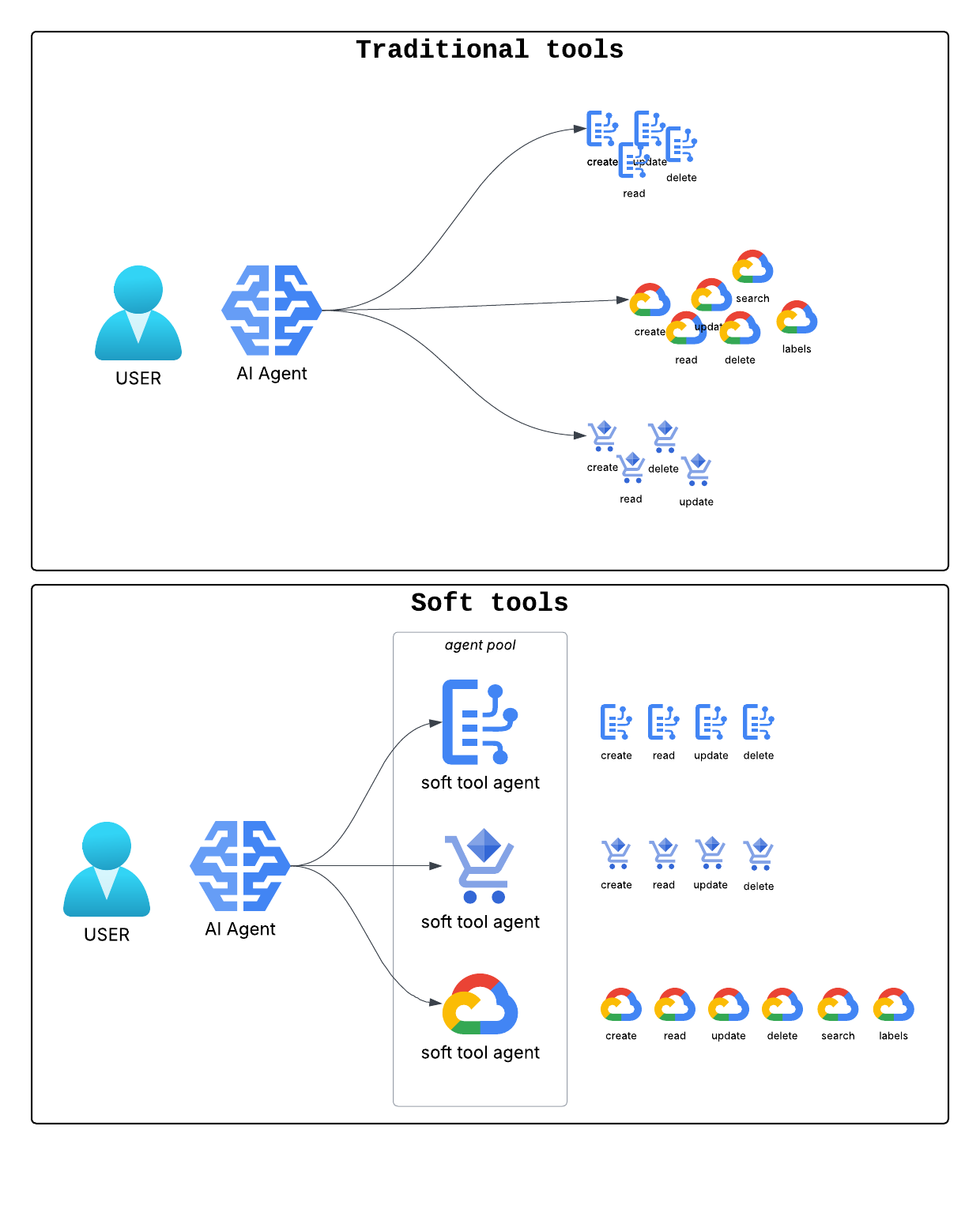
After experimenting with optimizing signatures and dynamic tool loading, we landed on a simpler idea:
abstract many tools behind one natural language interface.
Instead of giving the agent 50+ specialized tools, give it 4 intelligent sub-agents.
Hard Tools vs. Soft Tools
Traditional "Hard" Tools:
Available tools:
- drive_search: Search for files in Google Drive using Drive query syntax
  Parameters: {
  "type": "object",
  "properties": {
    "query": {
      "type": "string",
      "description": "Parameter: query"
    },
    "max_results": {
      "type": "integer",
      "description": "Parameter: max_results",
      "default": 10
    }
  },
  "required": [
    "query"
  ]
}

- drive_get_file: ...
- drive_delete_file: ...
- drive_create_folder: ...
[other drive tools]
..
- gmail_search_messages: ...
- gmail_get_message: ...
- gmail_send_message
- gmail_list_labels
- gmail
[other gmail tools]
...
Soft Tool:
Tool: gmail_agent
Description: Interact with Gmail - search, send, manage, using natural language instructions.
Parameters:
  - query: What you want to do with Gmail

Tool: drive_agent
Description: Search Google Drive using natural language queries.
Parameters:
  - query: What do you want to do with Google Drive
How It Works
graph TD
    A["👤 User
'Check for emails from my manager'"] --> B["🤖 Main Agent
Receives natural language request"]
    B --> C["📤 Calls gmail_agent tool
Instruction: 'Find emails today from tom@manager.com'"]
    C --> F["🔧 Translates to API call"]
    F --> G["📧 Executes: gmail_search_messages()
query='from:tom@manager.com after:2026-01-22'"]
    G --> H["📊 Returns results to Main Agent"]
    H --> I["✅ Main Agent delivers results to User"]

    style A fill:#1e293b,stroke:#60a5fa,stroke-width:2px,color:#e2e8f0
    style B fill:#1e293b,stroke:#60a5fa,stroke-width:2px,color:#e2e8f0
    style C fill:#1e3a5f,stroke:#3b82f6,stroke-width:2px,color:#e2e8f0
    style F fill:#2d1b4e,stroke:#a78bfa,stroke-width:3px,color:#e2e8f0
    style G fill:#2d1b4e,stroke:#a78bfa,stroke-width:2px,color:#e2e8f0
    style H fill:#1e3a5f,stroke:#3b82f6,stroke-width:2px,color:#e2e8f0
    style I fill:#1e293b,stroke:#60a5fa,stroke-width:2px,color:#e2e8f0
The key insight: The main agent speaks natural language. The specialized sub-agent handles the technical complexity.
Sub-agent
These are specialized tool calling agents whose job it is to translate a simple request into one or more tool calls, and then execute them.
There are quite a lot of modalities for the sub-agent workflow, from simple translate → call, to more complicated configurations that reflect on the tool output. However, their main quality is specializing in tool execution accuracy.
- Tool Context Isolation: The sub-agent can receive a very complicated and long list of available tools with every request, which is not exposed to the main agent. This allows us to hide the extra complexity away from the calling agent while maintaining rich descriptions of our tool functions.
- Enhanced Attention: Having fewer specialized tools preserves the agent's attention to the tool descriptions, allowing for greater accuracy in tool selection.
Real-World Impact
The results were dramatic:
Performance Metrics
Token overhead reduction per call: ~6,000 → 500 tokens
That's a 92% reduction in context overhead
Improved Accuracy
Better tool selection: The agent stopped confusing similar functions when there were only 4 clear choices instead of 50+ specialized and not relevant ones. With fewer options, the agent became more accurate and decisive in tool selection.
Conclusion: Simplicity Through Abstraction
The "Soft Tool" pattern demonstrates a counter-intuitive principle in AI engineering: sometimes the best way to add capabilities is to remove complexity from the interface.
By wrapping specialized tools behind natural language sub-agents, we achieved:
- 92% reduction in context overhead
- Faster response times
- Better tool selection accuracy
- A more scalable tool architecture
When to Use Soft Tools
Consider this pattern when:
- You have multiple tools from the same domain (e.g., Gmail, Drive)
- Tool descriptions are complex or numerous
- You notice tool selection errors
- Context costs are growing unsustainably
Trade-offs
Soft tools add an extra LLM call for each sub-agent invocation, but in practice, the same tool description context ends up being sent sparingly instead of with every request.