MarketPane and WebMCP: What We Learned Building for the Agent-Native Web
We finished the WebMCP Challenge in 1,318th place—roughly the 52nd percentile. That is not the ending we hoped to write, but it is an honest one, and the project taught us more than the ranking suggests.
Although the challenge ran for ten days, personal time off left us just three days to build our entry. In that window, we built MarketPane: a browser-based stock-screening and research workbench where a person and an AI agent work on the same canvas. The agent can define and run a screener, inspect ranked results, and create charts. The person sees those changes happen, can rearrange the panels, drill into a result, and keep working from there.
We packed a lot of development into those three days: a shared panel grid, typed screening tools, ranked results, interactive charts, a production market-data pipeline, and the WebMCP integration connecting it all. We also implemented substantial groundwork for broader research features. Some of that remained outside the live demo, but the amount we built in such a short window is something we are proud of.
That shared canvas—not a chatbot bolted onto a finance dashboard—was the heart of our entry.
Try MarketPane with an AI agent — requires a WebMCP-enabled browser
To use the AI-agent workflow, open MarketPane in Codex's in-app browser or another agent-enabled browser with WebMCP support. A regular browser can display the app, but the agent needs a compatible browser integration to discover and call its tools.
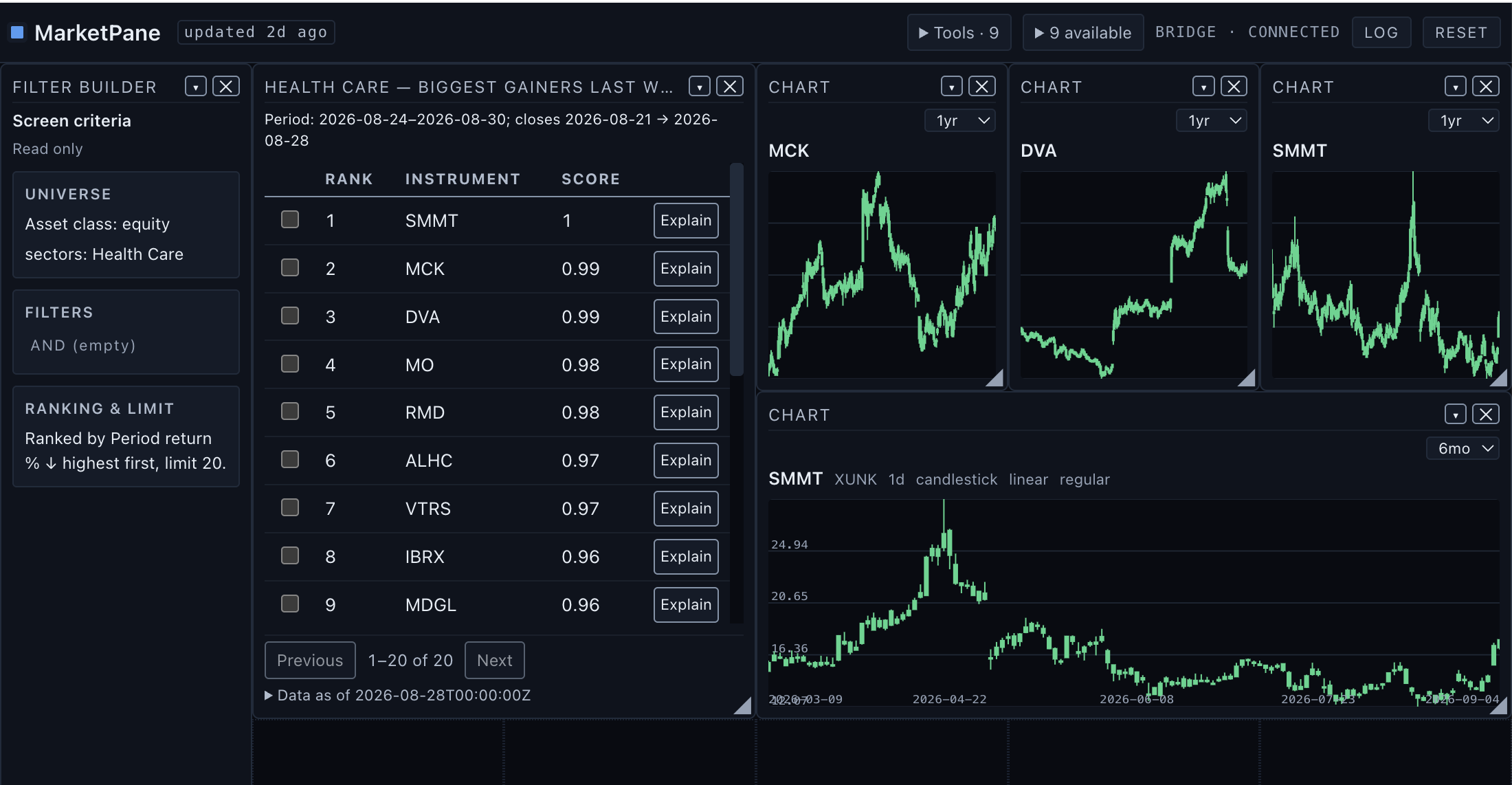
MarketPane's shared workbench: filter definition, ranked results, and charts created on the same visible canvas.
The hackathon and our entry
The WebMCP Challenge was a ten-day hackathon about building web experiences that become meaningfully better when people and AI agents can use them together. Entries needed a live application, open-source code, a short public demo, and a real WebMCP implementation. Projects were judged on WebMCP leverage, execution, potential impact, and creativity.
Our premise was simple: stock research is iterative. A person starts with a fuzzy idea—“show me the biggest health-care gainers last week,” for example—then refines the universe, changes a filter, inspects a result, opens charts, and asks a follow-up. Conventional chat separates that reasoning from the research surface. Conventional browser automation makes an agent hunt for buttons and reproduce drag-and-drop gestures designed for a mouse.
What is WebMCP?
WebMCP lets a web page publish named, callable tools to an AI agent
in the browser. Each tool has a description, a JSON input schema, and an
execute function. Instead of guessing what a page can do
from screenshots or DOM structure, the agent discovers capabilities the
site deliberately exposes.
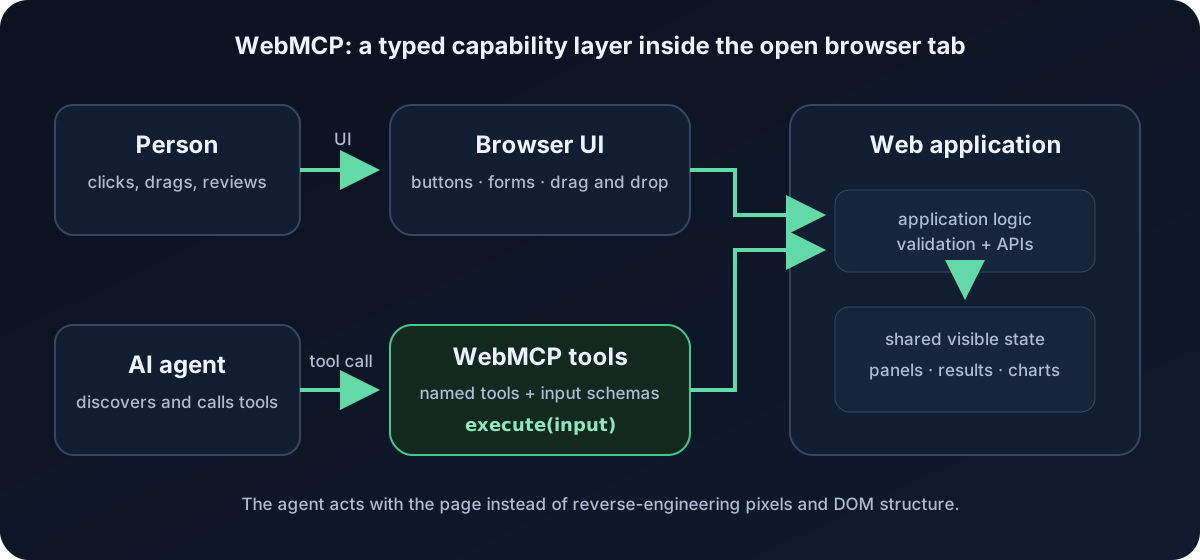
The important distinction is that WebMCP runs in the page. A tool can use the page's current state, authenticated session, and client-side logic. It is intended for cooperative, human-present browser sessions; it is not simply an MCP server moved into JavaScript, and it is not a replacement for unattended backend integrations.
For MarketPane, that means the human UI and the agent tool layer both operate on the same workspace document. If the agent creates a chart, the person sees a chart—not a hidden side effect described later in chat. If the person rearranges the workspace, the agent can read the new canvas state before deciding what to do next.
How MarketPane uses WebMCP
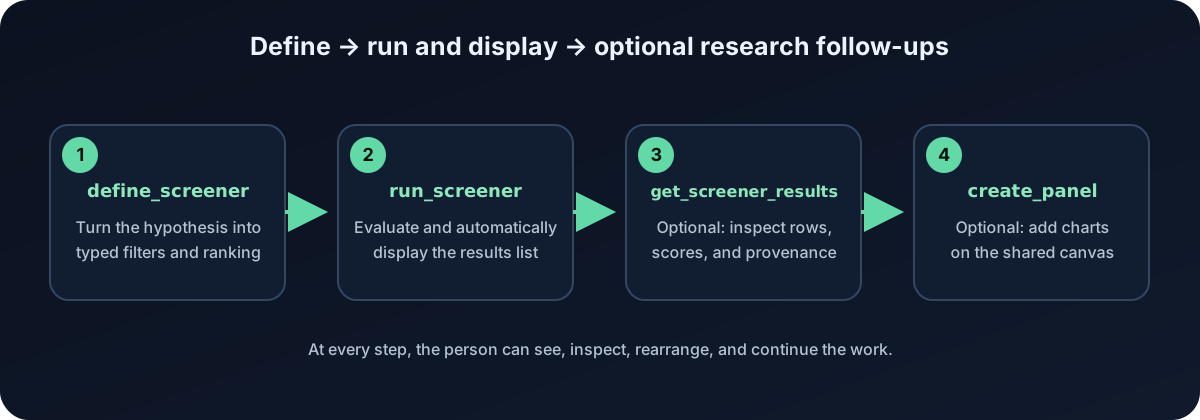
MarketPane gives the agent structured operations over the research workbench itself. We streamlined screening after the longer chain of calls repeatedly failed in practice. The current screener group exposes two tools:
define_screenersets the complete universe, filter tree, ranking, and limit in one call, replacing the separate creation and configuration calls.run_screenerevaluates the definition against our historical market-data panel and automatically binds the run to the first visible results list, creating a list if needed.
The agent no longer needs to manually assemble a results panel to
make a successful run visible. get_screener_results remains
useful when the agent needs to inspect the returned rows, and
create_panel can add charts as a follow-up. These are
additional research actions, not mandatory steps just to display a
screen. The simplification is a single definition call followed by
execution—not one combined define-and-run tool.
The frontend is a SvelteKit 5 single-page app. The backend is a FastAPI service that evaluates screeners with Python and pandas. Production price data comes from EODHD, but it is ingested ahead of time into an adjusted OHLCV Parquet panel stored in object storage and loaded by our backend. Research calls are therefore fast and reproducible; they do not make a new vendor API request every time an agent touches the workspace.
The discovery gap: tools can exist without the agent knowing
One of our most frustrating debugging experiences was seeing tools available inside the app while the agent still struggled to find or use them. We learned to separate three questions: did the page register its tools, can the browser's agent integration retrieve them, and does the agent know to look for them on this page? A successful answer to the first question does not establish the other two.
Finding tools on the current page
We encountered a concrete JavaScript visibility problem. Some agent
integrations inspect a page through an isolated execution world. A
compatibility object attached by the page to
document.modelContext can be visible to the application's
JavaScript but absent from that isolated world. Both sides are looking
at the same document, yet they do not necessarily see the same
JavaScript properties.
Our implementation added a JSON-only, same-document event relay so a compatible client could request the tool list and invoke the registered callbacks across that boundary. This was an application-specific compatibility measure: the client still had to know how to use the relay. Installing it did not automatically make every browser agent discover our tools.
We also exposed connection status, tool counts, and discovery guidance in the UI, and kept a standalone one-tool diagnostic page. Those helped us distinguish a registration failure from a visibility problem or a failed invocation. The strongest check remained an actual call through the agent's integration that produced the expected visible change. A green badge or a successful direct callback test alone was not enough.
Knowing which browser tab has useful tools
There is an earlier discovery problem too: an agent may see several open tabs without being given their tool catalogs. A tab title and URL tell it that a page exists; they do not necessarily tell it that the page exposes stock-screening tools, or that those tools would help with the user's request. It can miss a useful capability before it ever tries to inspect the right page.
In our testing, we could not treat the list of browser tabs as a searchable directory of WebMCP capabilities. Discovering tools on a selected page and discovering which page to select were separate steps. Automatic cross-tab awareness depended on what the browser or agent integration exposed, rather than anything our page could guarantee by registering tools.
The practical lesson was to make the starting point explicit: open MarketPane, identify that tab to the agent, and ask it to discover the page's WebMCP tools before beginning the research task. After navigation or a reported change in available tools, the integration needs to refresh its view of the current document's capabilities. Otherwise, the agent may fall back to UI interaction or work from stale assumptions about what it can call.
We would like browser integrations to provide a compact capability summary for each accessible tab, with a way to fetch the full catalog when needed. That would help an agent connect a request to a useful open application without loading every tool schema into its context. For us, this remained a lesson about the surrounding tooling: making a page callable and making its capabilities easy to notice are both essential parts of the experience.
What we learned about making WebMCP work
1. Registering a tool is the easy part; wiring it into the live product is the work
We designed and implemented a much larger tool surface—roughly 33 operations across workspaces, revisions, similarity search, chart annotation, alerts, watchlists, backtesting, and export. Many were tested. Several were also behind feature flags or never reached from the application's live composition root.
That distinction hurt us: implemented is not the same as registered, discoverable, callable, and useful in the deployed agent loop.
Our recovery was to narrow the live surface to the smallest meaningful vertical slice: define a screener, run it, read the results, and chart a row. A thin path verified end to end is worth more than a broad catalog the agent cannot reach.
2. The page needs one source of truth
The agent and human interfaces should call the same application operations. Building a separate “agent API” beside the UI invites drift: one path validates differently, creates different IDs, or updates state the other cannot see.
MarketPane worked best once the UI and WebMCP tools converged on one workspace document and one set of application services. The tool layer became a typed adapter, not a second product.
3. Tool descriptions and schemas are part of the user experience
An agent chooses among tools using their names, descriptions, parameters, and returned errors. Ambiguous names and overlapping tools create hesitation or the wrong call. Overly flexible schemas move uncertainty into runtime.
The best tools in our build had one clear intent, typed parameters, constrained enums, and actionable failures. Rather than accepting arbitrary expressions, the screener composes known fields and operators. The backend validates the same inputs again because a client-side schema is guidance, not a security boundary.
Error messages matter too. “Invalid input” is a dead end; an error that names the invalid field and the valid alternatives gives the agent a recovery path.
4. Stable handles beat giant payloads
Agents need compact, durable references to workspace objects: screener IDs, run IDs, result IDs, panel IDs, and instrument references. Returning an enormous state dump on every call is expensive and makes follow-up actions fragile.
We learned to return small structured results with stable handles, then expose focused read tools for the details. Pinning a result set also matters in finance: later calls should refer to the exact evaluated data and “as of” time, not silently rerun against a changed dataset.
5. Make agent actions visible
Human-in-the-loop is not achieved merely because a browser tab happens to be open. People need to understand what changed. MarketPane uses the panel grid, connection/tool-count status, and action log to make agent activity legible.
Visibility improves both trust and debugging. During development, a visible tool count immediately told us whether registration had succeeded. During use, a new result panel or chart is an inspectable artifact the person can keep, move, or remove.
6. Test the real discovery-and-execution path
Unit tests around tool callbacks were necessary but insufficient. The failures that consumed the most time lived between layers: browser support, bridge discovery, registration lifecycle, feature flags, route startup, and the deployed frontend talking to the production backend.
We eventually treated the full chain as its own deliverable:
page loads → bridge connects → tools register → agent discovers them → tool executes → backend evaluates → shared UI changes
If any arrow in that chain is assumed rather than tested, the demo is at risk.
7. WebMCP is still a moving target
During the project, current and older material disagreed about API
names and browser behavior. The authoritative draft uses
document.modelContext; examples elsewhere sometimes refer
to older surfaces. Browser support is experimental, secure-context
requirements matter, and a normal browser session cannot be assumed to
expose the API.
We added feature detection, a compatibility bridge for our supported environment, and a standalone one-tool diagnostic page. That tiny diagnostic was disproportionately valuable: before debugging a 30-tool application, prove that one tool can register, be listed, execute, and update visible page state.
The result

The final evaluation placed MarketPane 1,318th overall, around the 52nd percentile, with an aggregate score of 31: 8 for WebMCP leverage, 8 for execution, 8 for impact, and 7 for creativity.
We are disappointed by the placement. We also understand the lesson in it. We spent meaningful effort on architecture and on a wide future-facing capability set, while the judging surface rewards what is unmistakably live, easy to discover, and immediately demonstrable. The final build proved a real human-agent loop, but we could have made that loop simpler, earlier, and more obvious.
Watch the demos
- MarketPane: AI-Powered Stock Pattern Research with WebMCP — the concise final demo (1:08)
- MarketPane — Grid and Screener Update — a short progress update showing the workbench UI (0:31)
What comes next
The project leaves us with a clear direction. The broader features—similarity search, annotations, computed studies, watchlists, alerts, and backtesting—are useful only when introduced as small, complete workflows. We will keep widening the tool surface, but one verified vertical slice at a time.
The larger idea still feels right: agent-ready software is not just an API. It needs legible shared state, stable references, explicit capabilities, visible actions, and sensible boundaries between reading, proposing, and changing. WebMCP gave us a concrete way to build that experience directly into a web application.
The ranking closed the hackathon. It did not close the experiment.
MarketPane is a historical research tool, not investment advice. Market data may be delayed or incomplete.